


Fedora Atomic
Built to move forward.
Retains Fedora’s Atomic deployments, update origin and system rollback entry.
Meet Aven Union
Clearer words. Lighter windows.
For the things you do every day.

The everyday, thoughtfully refined
Find a file. Read a message. Revisit a memory.
Union brings care to the details you live with.
Clear places, paths and file lists. A pale sidebar, blue selection and restrained weights bring Chinese and Latin filenames together in Dolphin.
Select a file and press Ctrl + Alt + P. Preview images, PDFs, text and common media. Esc returns to Files; Enter opens the default application.

Firefox navigation, address bar and window controls share one row. A single page stays compact; multiple pages retain the full tab strip.

Folders, messages and reading each have their place in Thunderbird. Medium-weight headings sit beside regular text, with real application commands in the toolbar.

Browse albums in Gwenview. A photo grid, pale sidebar and consistent window frame accompany native navigation, zoom and full-screen viewing.

Unmodified captures · Files: round 08. Mail and Photos: round 07. Browser and Preview: round 06. Earlier rounds retain a floating Dock. Messages are fictional fixtures.
The difference is in the details
Move the divider to compare stock Fedora Kinoite with Union.
 Stock FedoraUnion
Chinese and Latin filenames with the full-width panel, captured in round 08.
Unmodified 1920 × 1200 captures at 100% scale. Union captures come from test VMs in rounds 06 / 07 / 08, recorded separately from ISO installation and online update checks. Layouts, sample content and interaction states differ. Only Files in this comparison shows the full-width panel.
Thoughtful typography
Adwaita Sans meets Noto Chinese in the desktop interface. Regular text uses weight 400; theme-managed Chinese headings and emphasis use a true 500 Medium. Clearer hierarchy, from filenames to messages.
See real Chinese typography字里行间,
留一点从容。
A little room to read.
A lighter desktop
A full-width translucent panel meets the bottom edge of the screen. Workspaces sit on the left, everyday apps in the center, and the tray and date on the right. Native launching, switching and running indicators stay within reach.
Native round 08 layout capture. Online installation uses the new defaults; routine updates of existing installations retain their layout.
See the latest panel capture
Calm on the surface. Capable underneath.
Built on Fedora Kinoite. Focused on the everyday.
The Linux foundations you know are still here.
Fedora Atomic
Retains Fedora’s Atomic deployments, update origin and system rollback entry.
KDE Plasma
Dolphin, Firefox, Thunderbird and Gwenview, brought together by considered visual details.
Open development
Explore the source, original screenshots, installation guide and verification records in the public repository.
Explore the source
AVEN 0.4.0 · ONLINE INSTALL & UPDATES
Already on Kinoite? Add Aven.
Get the next improvement through component updates.
Later theme and app integration updates reuse cached components. No new ISO download is needed.
Routine updates retain panel layouts, pinned apps, folder views, accounts, bookmarks and personal files.
Signed components are verified before use, with interrupted-update recovery and rollback to the previous Aven profile.
ONLINE INSTALL · 0.4.0
For Fedora Kinoite 44 x86_64. Existing Aven ISO installations can join the same update channel.
Currently supports Kinoite 44 x86_64 only. Initial setup includes Plasma 6.8 Beta and may download roughly 440 MB of system packages, plus missing apps and fonts.
Check the installer SHA-256 first. Close Files, Browser, Mail, Photos and Preview. Run in Konsole as your desktop user; do not prefix the installer command with sudo.
tar -xzf Aven-Installer.tar.gz
python3 aven-installer/aven.py install
If dependencies are staged, reboot and finish with the command below. Log out and back in after installation completes.
~/.local/bin/aven updateaven checkaven update --download-onlyaven updateaven statusRoutine updates keep your layout. To adopt new defaults, including the full-width panel shown here, explicitly run aven update --reset-defaults. This reapplies the default layout and settings.
Close apps and log out of Plasma first. Use a text console (Ctrl + Alt + F3) or SSH so running apps cannot overwrite restored settings.
aven recoveraven rollbackRecovery checks for later edits and reports conflicts. Aven profile rollback is separate from Fedora deployment rollback. System and security updates remain in Discover or rpm-ostree.
Verified: installation from the official Kinoite baseline, dependency staging and reboot, component upgrades, settings and data preservation, interrupted-apply recovery and profile rollback. One theme-only test downloaded 20,749 bytes; actual sizes depend on the changed components.
Read update verification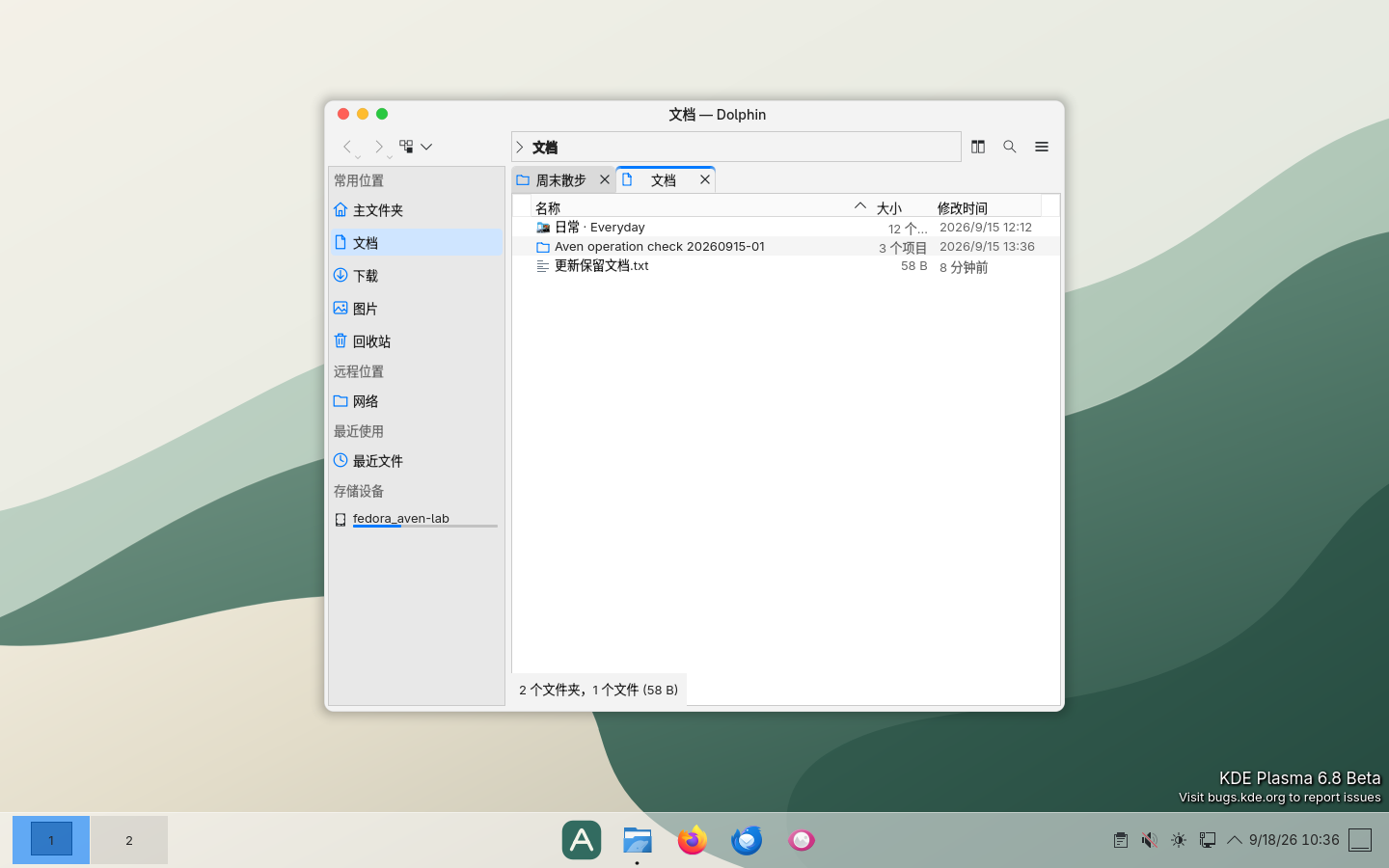
The offline installer remains Union 0.3.1. After installation, use the online installer above to join the 0.4.0 channel. The ISO has not been rebuilt with the latest panel.
x86_64 · Fedora Kinoite 44 · Offline installer ISO
An experimental Plasma 6.8 Beta prototype. Start in a virtual machine.
Download metadata JSONThis is an installer, not a live desktop. See the guide for installation steps and the verified scope.